Bark Watch Review: What This Kids Smartwatch Does Well, and Its Limits
Short answer: the Bark Watch is a locked-down smartwatch for a younger child who is ready for a little independence but not a phone. It does four things well: real-time GPS location, calls and texts with only parent-approved contacts, AI safety alerts that scan the child’s texts, photos and videos for dangers like bullying or predators, and an SOS button that dials 911.
It has no apps, no social media and no web browser by design, so it is genuinely simple and hard to misuse. The trade-offs: it needs a mandatory cell-service plan, it does not monitor social apps (there are none to monitor), and it is aimed at early independence, not teenagers. Editorial score: 4.0 / 5. Prices verified September 24, 2026.
What the Bark Watch is
The Bark Watch is a standalone LTE smartwatch built to give kids a way to stay in touch without giving them the open internet. It runs its own cellular connection, so it works without a paired phone and without your own carrier. On the watch a child can call and text approved contacts, take photos and video, track their steps, and press an emergency SOS button.
In the parent app you see their live location, approve every contact, and get alerts if Bark’s AI spots something concerning in their messages. Verified on bark.us July 20, 2026.
There are two Bark Watch models, and a new order gets the newer one
This is worth knowing before you buy, because most reviews of this watch describe only one of them. Bark’s own support pages identify two models, which it calls the Samsung model and the Schok model, and they set up differently. On the question of which one arrives, Bark is direct: when you order a new watch you get the latest model, currently the Samsung.
Replacements split two ways, and Bark is specific about it: a damage or loss replacement also gets you the latest model, while a warranty replacement or an AKKO claim gets you the same model you already have, so a Schok watch stays a Schok watch. Read from Bark’s support site on August 12, 2026, on an article that carries no published date of its own.
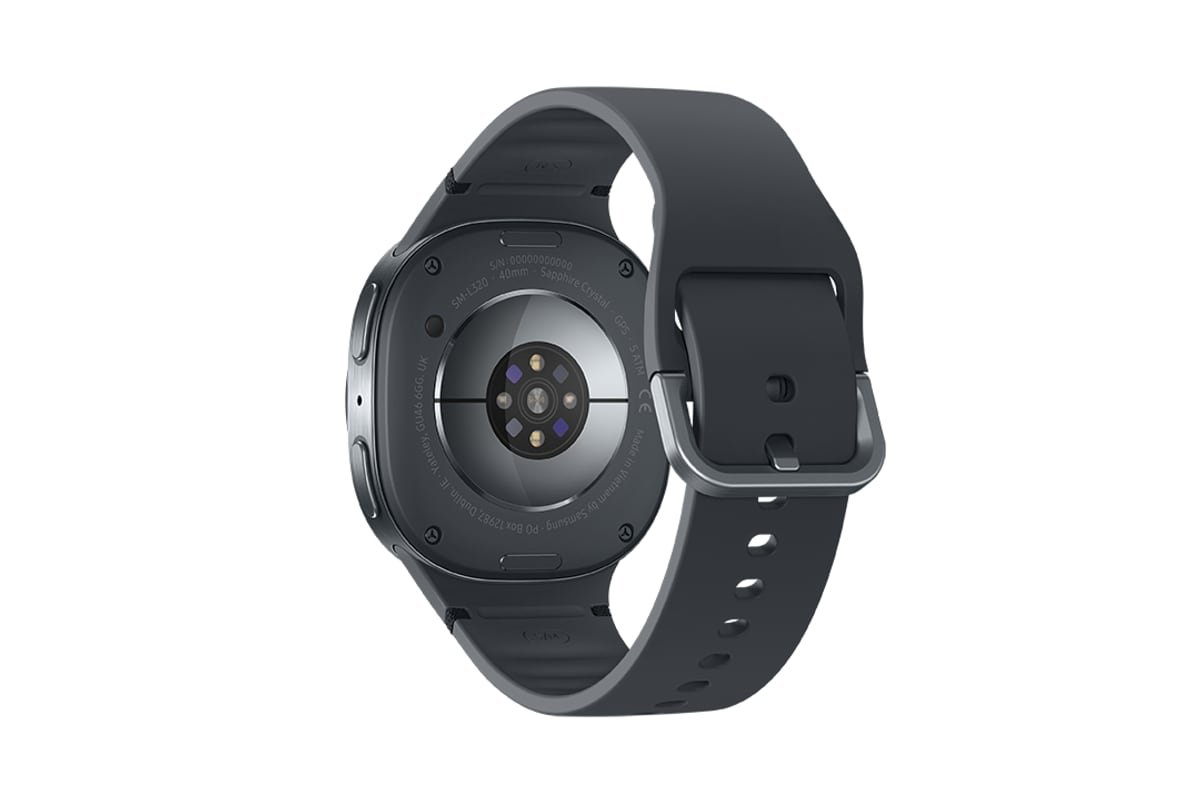
What each one actually is, in Bark's own words. The Samsung model is a Samsung Galaxy Watch8, which is why you will see it searched for as the GW8. The older one is a Schok Chronovolt CV16, which is where the ChronoVolt name attached to the Bark Watch in listings and accessories comes from. Telling them apart on the wrist is a five second job: Bark says the Samsung model has a circular sensor on the back and the Schok model has a power symbol.
Bark also publishes separate help articles for features it labels Samsung model only, including the heart rate reading, the voice recorder and the calculator, so the two are not identical in what the child can do with them.
What this changes for a buyer. Specifications you read in an older review, including ours before this update, may describe the Schok hardware rather than the watch that will arrive in the box. The parental control side is the same product either way, because the monitoring, the approved contacts, the location and the alerts are Bark’s software rather than the watch maker’s.
The hardware details, the on-watch extras and the setup steps are where the two differ. If a spec matters to your decision, confirm it against the model you are actually being sold.
At a glance
| Best for | Younger kids (early elementary to pre-teen) ready for a first connected device |
|---|---|
| Hardware | Current model is a Samsung Galaxy Watch8; the older Schok model still ships as a like-for-like replacement (read August 12, 2026) |
| Connectivity | Standalone 4G LTE with its own phone number, no paired phone or outside carrier needed; Wi-Fi is needed once, for setup (read August 18, 2026) |
| Monitors | Texts, photos and videos on the watch, plus 24/7 GPS location |
| Does not monitor | Social media, apps, web browsing (the watch has none of these) |
| Safety | AI alerts for bullying, predators and self-harm language; SOS button that dials 911 |
| Contacts | Parent-approved only; unknown numbers are blocked automatically |
| Durability | IP68 water-resistant (rated to 1.5 meters); 5 MP camera; step tracking |
| Price | 15 dollars a month service plus 10 dollars a month for the device over 24 months, about 25 dollars a month all in (read September 24, 2026) |
| Guarantee | 60-day money-back guarantee on the device only (wireless plan payments are not refunded); free shipping; free number transfer |
Watch specifications verified on bark.us on July 20, 2026, with the two hardware models re-read from Bark's support site on August 12, 2026 and the battery, power-saving and routine details on August 16, 2026. Prices are from Bark's own pricing article, verified September 24, 2026.
What it covers, and what it does not
The honest way to read the Bark Watch is that it is deep on location and communication safety and deliberately empty everywhere else. That is the whole point of a locked device, but it also decides who it suits.
So the "zero coverage" rows are not weaknesses in the usual sense. There is nothing to monitor because the watch removes those risks entirely. The catch is that this only works while a child is young enough for a contacts-only device. The day they need social apps, the watch cannot follow them there, and you move up to the Bark app or Bark Phone.
Battery, and the location trade-off Bark documents
Bark publishes no hours-per-charge figure for the watch, so neither do we. What it does publish is the battery in each model, and the two low-power modes, and one of those modes changes what the watch is for. The newer Samsung model, the one a new order gets, carries the smaller battery of the two: Bark lists 325 mAh for the Samsung model and 700 mAh for the older Schok model, both non-removable. Anyone comparing spec sheets should know the number moved down, not up.
| Samsung model (current) | Schok model (older) | |
|---|---|---|
| Battery | 325 mAh, not removable | 700 mAh, not removable |
| Charger | Magnetic cable with a puck on the end | Magnetic cable with pin contacts |
| Power saving | Off by default; limits some features including location tracking | Off by default; limits some features such as WiFi connectivity |
| Watch Only mode | Yes, engages on its own at 1 percent battery | Not documented for this model |
The trade-off worth reading twice. On the Samsung model, Bark states plainly that power saving can delay location updates, "sometimes by a lot", and its own advice is that if keeping your child's location current matters most, you leave power saving off. That is the honest tension in a safety watch: the setting that makes the battery last is the setting that makes the tracking late.
And there is a failure mode parents should recognise. Bark says Watch Only mode switches on by itself when the battery drops to 1 percent: the watch shows only the clock, it stops updating location, and the child cannot get calls or texts. In the parent app the watch will look turned off. So a watch that appears powered down in your dashboard may simply be flat, and it comes back on its own once it is charged. Battery details read from Bark support on August 16, 2026.
Pros and cons
Pros
- Standalone LTE: works without a paired phone or your own carrier
- Real-time 24/7 GPS, the feature parents of young kids most want
- Approved-contacts-only calling and texting; unknown numbers auto-blocked
- AI safety alerts scan texts, photos and video for real dangers
- Emergency SOS that dials 911, plus IP68 water resistance for daily wear
- Genuinely locked down: no apps, no social media, no browser to misuse
- 60-day money-back guarantee on the device and free number transfer lower the risk of trying it
Cons
- The monthly cell-service plan is mandatory; it will not run on WiFi or your existing carrier
- Total cost is not cheap: 15 dollars a month plus 10 dollars a month for the device, about 25 dollars a month all in
- No social, app or web monitoring, so it does not help once a child is on social platforms
- Aimed at younger children; a teenager will outgrow a contacts-only watch quickly
- GPS is not always instant; location can lag briefly, especially indoors
- The current Samsung model carries the smaller battery of the two (325 mAh against the older model's 700 mAh), and Bark's own power-saving mode buys battery by delaying location updates
- Device protection for cracks, water damage and loss is an extra 3 dollars a month
- Send a damaged watch back and Bark charges a percentage of a price it does not publish: 50 percent of MSRP for a scratched or cracked screen, the full MSRP if it is beyond repair or not returned
What it costs (verified September 24, 2026 on Bark's own pricing article): the Bark Watch is 15 dollars a month for the cell-service plan, plus the device at 10 dollars a month financed over 24 months, so a financed watch is roughly 25 dollars a month all in. Bark publishes no upfront price for the device, so we do not print one. That monthly plan bundles the parental controls, LTE talk and text, and a family Bark Premium subscription (a 14 dollar a month value) that lets you manage other devices.
Shipping and transferring an existing number are free, and there is a 60-day money-back guarantee. Optional device protection is 3 dollars a month.
Best for: parents of younger kids (roughly early elementary to pre-teen) who want location, approved calling and texting, and safety alerts without handing over the internet. Think twice if: your child is already on social apps (you need the Bark app or Bark Phone), you want to avoid an ongoing subscription, or you only care about location and would rather pay less for a pure GPS tracker.
See the Bark Watch and current pricing
Where the watch fits in Bark’s lineup
Bark sells three things that get confused with each other. Matching the product to your child’s age is most of the decision.
| Product | What it is | Best age |
|---|---|---|
| Bark Watch | Standalone watch: calls, texts, GPS, safety alerts, no internet | Younger kids, first device |
| Bark app | Software that monitors an existing phone across 30+ apps | Older kids who already have a phone |
| Bark Phone | A full, tamper-resistant smartphone with monitoring built in | Tweens and teens ready for a phone |
For a direct head-to-head with its closest rival, see Bark Watch vs Gabb Watch, which weighs the message alerts, 911 SOS and real-time GPS against Gabb's cheaper, simpler, camera-free approach. To see how it stacks up against the Gabb Watch, Verizon Gizmo Watch 3 Adventure, T-Mobile SyncUP KIDS Watch 2 and an Apple Watch together, read our roundup of the best kids smartwatches with GPS.
Our full Bark review covers the app and the subscription tiers, including what Bark can and cannot monitor on an iPhone. When a child outgrows a contacts-only watch, the next step up is the phone, and our Bark Phone review covers what it really costs once the device instalment is added to the plan. If you are still comparing brands rather than Bark products, our guide to the best parental control apps puts Bark next to Qustodio, Aura, Life360 and Gabb.
Frequently asked questions
Which Bark Watch model will I get, the Samsung one or the Schok one?
The Samsung one, if you are ordering new. Bark identifies two Bark Watch models on its support site, which it calls the Samsung model and the Schok model, and states that when you order a new watch you get the latest model, currently the Samsung. Replacements split two ways: Bark says a damage or loss replacement also gets you the latest model, while a warranty replacement or an AKKO claim gets you the same model you already have, so a Schok watch stays a Schok watch. You can tell them apart from the back of the watch: Bark says the Samsung model has a circular sensor and the Schok model has a power symbol. The Schok one is the older design and is sold under the ChronoVolt name by its manufacturer. Bark also lists some on-watch features as Samsung model only, including heart rate, the voice recorder and the calculator, so an older review may describe hardware you will not receive. The monitoring, approved contacts, location and alerts are Bark software and work the same on both. Read from Bark support on August 12, 2026.
How much does the Bark Watch cost?
The Bark Watch is 15 dollars a month for the cell-service plan, plus the device at 10 dollars a month financed over 24 months, so a financed watch runs about 25 dollars a month all in. Bark publishes no upfront price for the watch device, so we do not quote one. The monthly plan bundles parental controls, LTE talk and text, and a family Bark Premium subscription. Prices verified September 24, 2026 on the Bark pricing article. Separately, Bark's Watch product page listed an optional device-protection plan at 3 dollars a month when we read it on July 20, 2026; the pricing article does not mention it.
Is the Bark Watch waterproof, and can a child swim in it?
The answer changed with the newer model, so check which one you have. Bark states that the Samsung model is a Samsung Galaxy Watch8 rated 5ATM and IP68, that Samsung rates it for swimming in pools and shallow water, and that you should turn on Water Lock before your child gets in. The older Schok model, the Schok Chronovolt CV16, is rated IP68 for submersion in 1 to 3 meters of fresh water for up to 30 minutes and Bark says it is not advised for extended beach or pool use. So a child can swim in the current watch and should not make a habit of it in the older one. Bark is careful about the limits either way: it states the ratings come from still, fresh-water lab tests, 5ATM at 50 meters for 10 minutes and IP68 at 1.5 meters for 30 minutes, and that real swimming is not the same as a lab test, so the numbers are a guide rather than a depth limit. Bark says not to use the watch for diving, snorkelling, water sports such as water-skiing or surfing, fast-moving water, or high-pressure or hot water like a sauna or a hot shower, and to rinse it with clean fresh water and dry it after a pool or the ocean. It also notes that water resistance is not permanent and diminishes with wear. Read from Bark support on August 12, 2026.
Where can I buy a Bark Watch, and is it sold in stores?
It is not a walk-into-a-shop purchase. Bark sells the watch directly, and Bark’s own support pages state that orders are usually fulfilled within three to five days and that shipping is free. Bark also names Amazon as a place you can buy it. We did not find it stocked in physical retail chains, so plan on ordering rather than picking one up. Two details worth knowing before you do: Bark states the watch comes with a 60-day satisfaction guarantee that covers the device cost, and that the service plan cost is not eligible for refunds, so the subscription you pay while trying it out is not coming back. Verified July 28, 2026.
Does the Bark Watch work without Wi-Fi?
For everyday use, yes. Bark states the watch is "a standalone device with its own phone number" that "does not pair with a phone or the Galaxy Wearable app, and it does not need to", and it carries its own LTE connection, so calls, texts and location do not depend on your home network. Setting it up is the exception: Bark's own instructions for both models say to connect to Wi-Fi when prompted and then scan a QR code from the parent phone, so you need a Wi-Fi network once, at the start. One model-specific catch if you are setting up the older watch: Bark notes that the Schok model only supports the 2.4GHz band, so a router broadcasting 5GHz alone will not get you through setup. Verified August 18, 2026.
Does the Bark Watch need a phone or a separate carrier?
No. The Bark Watch has its own LTE connection, so it works as a standalone device without a paired phone and without your own carrier. That also means the monthly cell-service plan is mandatory: the watch will not run on WiFi alone or on a plan you already have. Bark can transfer an existing kid’s phone number to the watch for free.
What can the Bark Watch monitor?
It scans texts, photos and videos sent on the watch and alerts you to serious issues like bullying, predators and suicidal language, and it tracks location 24/7. What it does not monitor is social media, apps or web browsing, because the watch has none of those by design. For monitoring a child already on Snapchat, Instagram or TikTok, you need the Bark app or Bark Phone instead.
Can you download apps on the Bark Watch?
No. The Bark Watch has no app store, no web browser and no social media, and that is a design choice rather than a missing feature. The on-watch extras are short: Bark lists heart rate, a voice recorder and a calculator, and those three are Samsung model only. Everything else, calls and texts with parent-approved contacts, location and safety alerts, is Bark software rather than an app the child opens. If you want apps that exist but stay controlled, that is the Bark Phone. Device features read from Bark support on August 12, 2026.
How long does the Bark Watch battery last?
Bark does not publish an hours-per-charge figure for the watch, so treat any specific number you see elsewhere with caution. What Bark does publish is the battery in each model and how to stretch it: the current Samsung model has a 325 mAh battery and the older Schok model a 700 mAh one, both non-removable, so the newer watch has the smaller battery of the two. Both models have a power-saving mode that is off by default, and on the Samsung model Bark warns that it delays location updates, "sometimes by a lot", advising you to leave it off if current location matters most. At 1 percent the Samsung model drops into Watch Only mode on its own: it shows the clock, stops updating location, takes no calls or texts, and looks turned off in your Bark app until it is charged. Bark's own battery advice is to lower screen brightness, shorten the screen timeout, keep calls short, turn off Bluetooth and WiFi, and keep the watch out of very hot or very cold temperatures. Read from Bark support on August 16, 2026.
Can you set school hours or a bedtime on the Bark Watch?
Yes, through what Bark calls routines. Bark documents four routine types you schedule from the parent app or dashboard: Bedtime, School time, Free time, and a Default rules set that applies whenever no other routine is running. You can also keep it simple and run the Default rules alone. Within a routine you set the rules that make sense on a watch rather than a phone: Bark lists the contact, text and silent mode rules as the ones you customise per routine, and silent mode mutes the ringer for calls and texts while that routine is active. The routine in effect at any moment is labelled Active, temporary Start and Delay overrides are available, and Bark notes that changes may take a few minutes to reach the watch. Read from Bark support on August 16, 2026.
What age is the Bark Watch best for?
It fits younger children, roughly early elementary through the pre-teen years, who are ready for some independence but not a full phone. Parents approve every contact the child can call or text, and non-contacts are blocked automatically. Once a child is old enough for social apps, a locked-down watch is no longer enough and the Bark Phone or app becomes the better tool.
Can the Bark Watch replace the Bark app or Bark Phone?
They solve different problems. The watch is a first connected device for a younger child: calls, texts, GPS and safety alerts with no internet. The Bark app monitors an existing phone’s content across 30-plus apps, and the Bark Phone is a full, tamper-resistant smartphone for an older child. Many families start with the watch and move up to the app or phone later.
Can you buy the Bark Watch outside the United States, in Canada for example?
No, and Bark says so plainly. Its international availability page states: "We don’t ship the Bark Phone, Bark Watch, Bark Home, Bark Sync, or routers outside the United States. This includes U.S. territories like Puerto Rico and Guam." So Canada is out, and so is everywhere else; Bark runs a waitlist for other countries rather than shipping. The service is available more widely than the hardware, which is the distinction to hold on to: Bark states "Right now, Bark supports users in the U.S., Australia, and South Africa", and that families in a U.S. territory, Australia or South Africa "can still use our apps: Bark Parental Controls and Bark Kids" even though no watch will arrive. Coverage matters after the purchase too. Bark states that "The Bark Phone and Bark Watch only work on cell service within the United States, including Alaska and Hawaii", and that coverage in territories like Puerto Rico and Guam "is not guaranteed". Read from Bark’s own support site on August 19, 2026.
How does the Bark Watch compare with giving a child an Apple Watch?
They are built on opposite premises. An Apple Watch set up through Family Setup is a general-purpose smartwatch with parental limits added on top, and it has real requirements before it works for a child without their own iPhone; we set those out, with the other kid smartwatches, in our roundup of the best kids smartwatches with GPS. The Bark Watch starts from the other end: it is locked down by design, with no browser and no app store, and Bark states that it "doesn’t support third-party apps and can’t make international calls either" (read August 19, 2026). What Bark adds instead is the text-alert layer on the messages the child actually sends and receives. The practical way to choose: an Apple Watch suits an older child in a household already running on Apple, where the point is a real watch. The Bark Watch suits a younger child where the point is that the device cannot quietly become a second phone.
How we reach these verdicts, and the sources behind them, is on our methodology page. Four different dates sit on this page, deliberately, because a fact and its date are two facts: prices come from Bark's own pricing article, verified September 24, 2026; the model line-up and the water ratings were read from Bark's support site on August 12, 2026; the battery, power-saving and routine details on August 16, 2026; and the remaining feature claims on July 20, 2026. Our editorial score is our own opinion, and any ratings or awards would be attributed to their source, never presented as our own.